

Case Study · Mobile · 2024

A social platform that gives school communities a digital home: the people, the memories, and the conversations that shaped you.

Reconnect · Network · Communicate
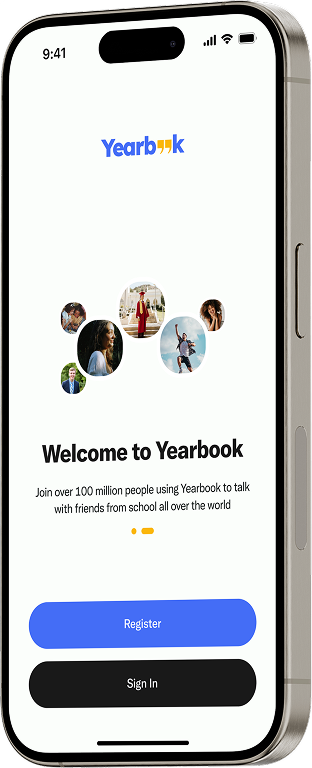
Yearbook welcome screen on an iPhone: friend avatars above Register and Sign in
Role
Product Designer + Brand Identity
Platform
Mobile App
Focus
Social · Memory · Community
Year
2024
+89% felt reconnected 4.2× memories shared −44% onboarding drop-off
The 90-second version

The problem

When students graduate, their school connections stop being maintained. Social media is too broad to hold a community built on shared history.

What I owned

The full product: research, brand identity (logo, colour, type), and seven core feature systems from onboarding to 24-hour stories.

Three intentions

  • Reconnect with the communities that shaped you
  • Remember through a living archive
  • Engage warmly, not for metrics

What changed

  • +89% felt more connected in a week
  • 4.2× memories shared per session
  • −44% onboarding drop-off
01 · The problem

Why school connections go quiet.

Different cities, new jobs, shifting schedules. After graduation there is no obvious mechanism to keep school relationships alive, and five failure modes kept appearing in the research.

(01)

Fragmented connections

Alumni gradually lose touch: geographic distance, changing lifestyles, reduced communication.

(02)

No dedicated platform

Social media is too broad. No focus on shared history, and weak community structure.

(03)

Event coordination gaps

Reunions are hard to organise: no central hub, scattered communication, low participation.

(04)

Missed opportunities

Valuable connections go unused: no mentorship pathways, limited networking, fading shared experiences.

(05)

Loss of identity

Memories aren't preserved, emotional connection fades, school culture is lost.

People lose more than contact. They lose access to a shared history that could still matter to them years later. Nostalgia isn't sentiment; it's a signal, and most platforms ignore it.

02 · The vision

Three intentions. Every decision traced back.

(01)

Reconnect

Make it effortless to find and re-enter the communities that shaped you: schools, sports teams, workplaces, old neighbourhoods.

(02)

Remember

Give every community a living archive: photos, milestones, and shared moments, built to outlast any platform.

(03)

Engage

Social mechanics that feel warm and intentional, not attention-driven. Connection over metrics.

0%

think about a past community at least monthly, but have no structured way to act on it.

0%

said they would actively use a dedicated platform for community memories.

0×

more likely to engage when content connects to a shared identity, not just a shared interest.

03 · The identity

Every voice adds to a shared story.

Quotation marks signal speech: words, voices, shared expression. Yearbook is built on the same idea, capturing memories and conversations between people who once shared a space. The double quotation mark in the wordmark is the visual shorthand for those connections, designed to feel active, not fixed.

What the mark stands for
  • Individual voices within a collective
  • Shared stories and memories
  • Conversation and reconnection
  • A living record of shared experience
Primary Yearbook quotation-mark logo in blue and peach
Outlined version of the Yearbook logo
Mono version of the Yearbook logo
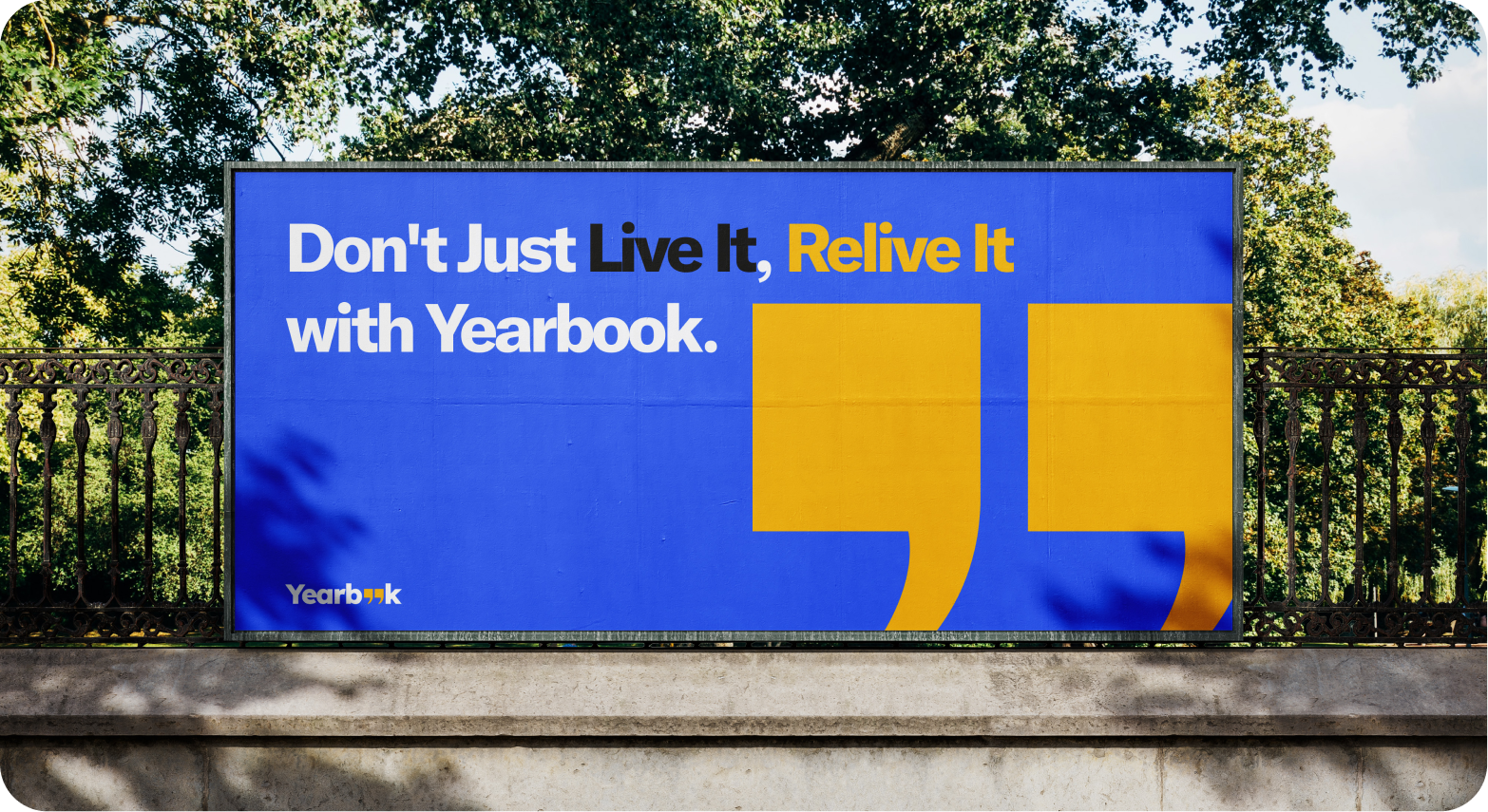
Yearbook wordmark in white across brand blue and deep navy quotation-mark shapes
Blue
#446DF6
Bright Peach
#FAB70B
Black
#19191B
White
#F6F7FC
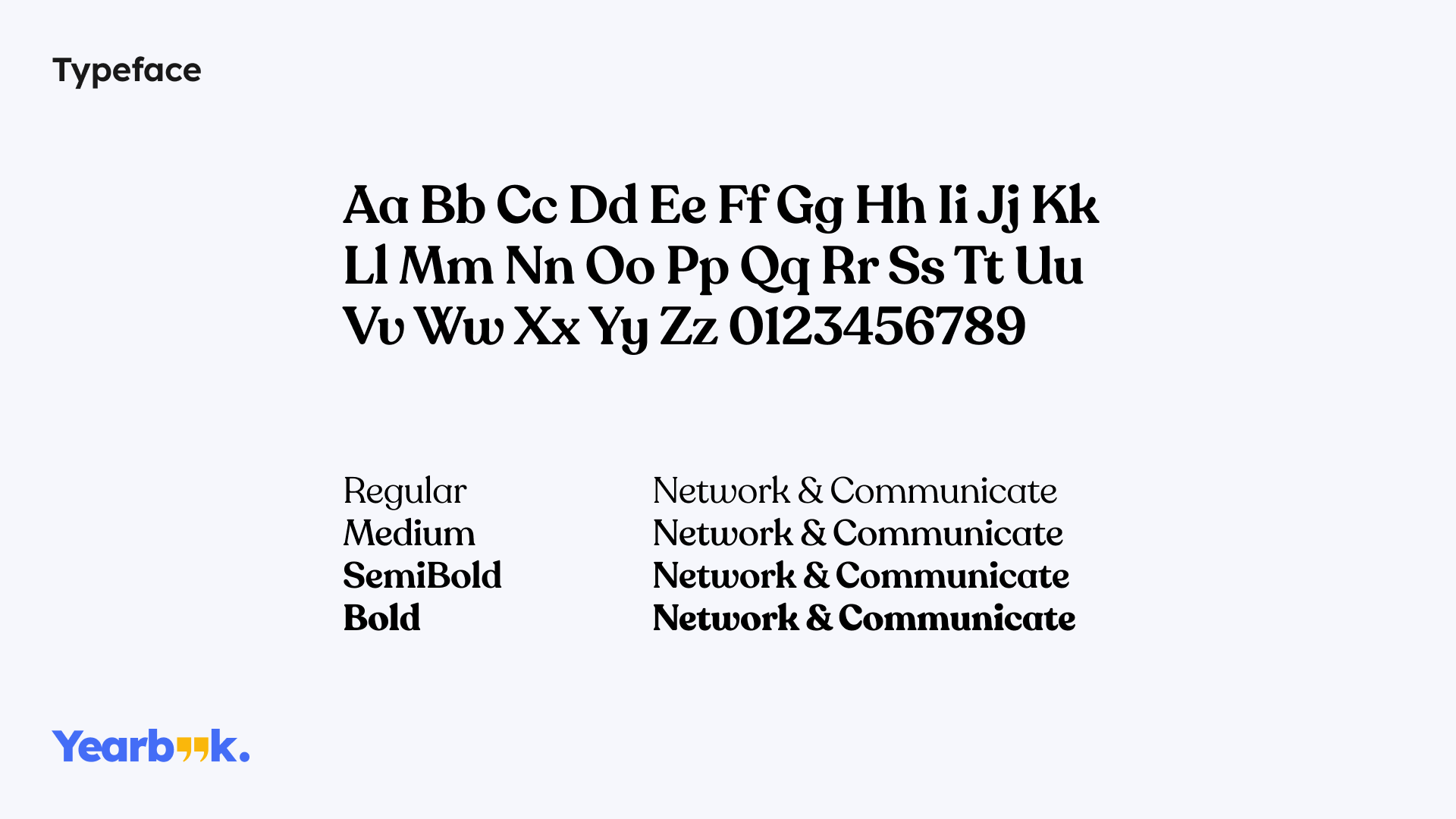
Recoleta typeface specimen: full alphabet with Regular, Medium, SemiBold and Bold weights
Typeface · Recoleta, warm and a little nostalgic on purpose
04 · The product

Seven systems, one community.

Each feature was specified as a system: the user flow, the logic underneath it, and the edge cases that keep it honest.

System 01

School registration

Onboarding starts by connecting users to the right institution. Search by name and location, with city and country on every result so two schools with the same name are never confused. Selections become the user's community connections.

How it works

01

Land on the institution list, each entry showing name and city/country.

02

Real-time search filters as the user types; "Showing results for…" confirms the query.

03

Follow toggles flip instantly, multi-select, no confirmation step.

04

Next unlocks after one follow; "Continue Later" offers an escape.

System logic

Fuzzy matching against school name and location fields.

Follow state stored locally and synced on proceed, so nothing is lost.

Unlisted school? Users can register it; name + location form a composite key that prevents duplicates.
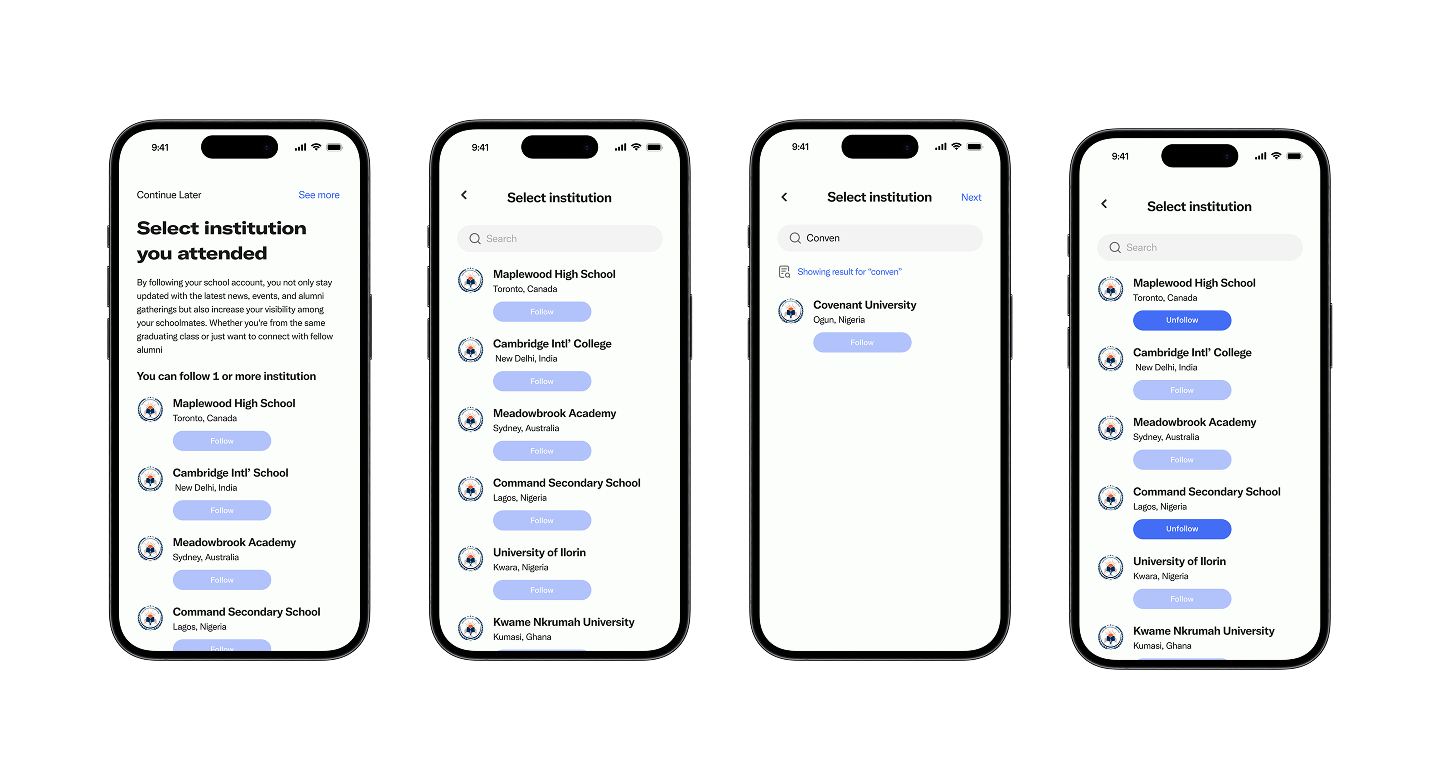
Four screens of the school registration flow: list, search, result, and following states
System 02

Add a new school

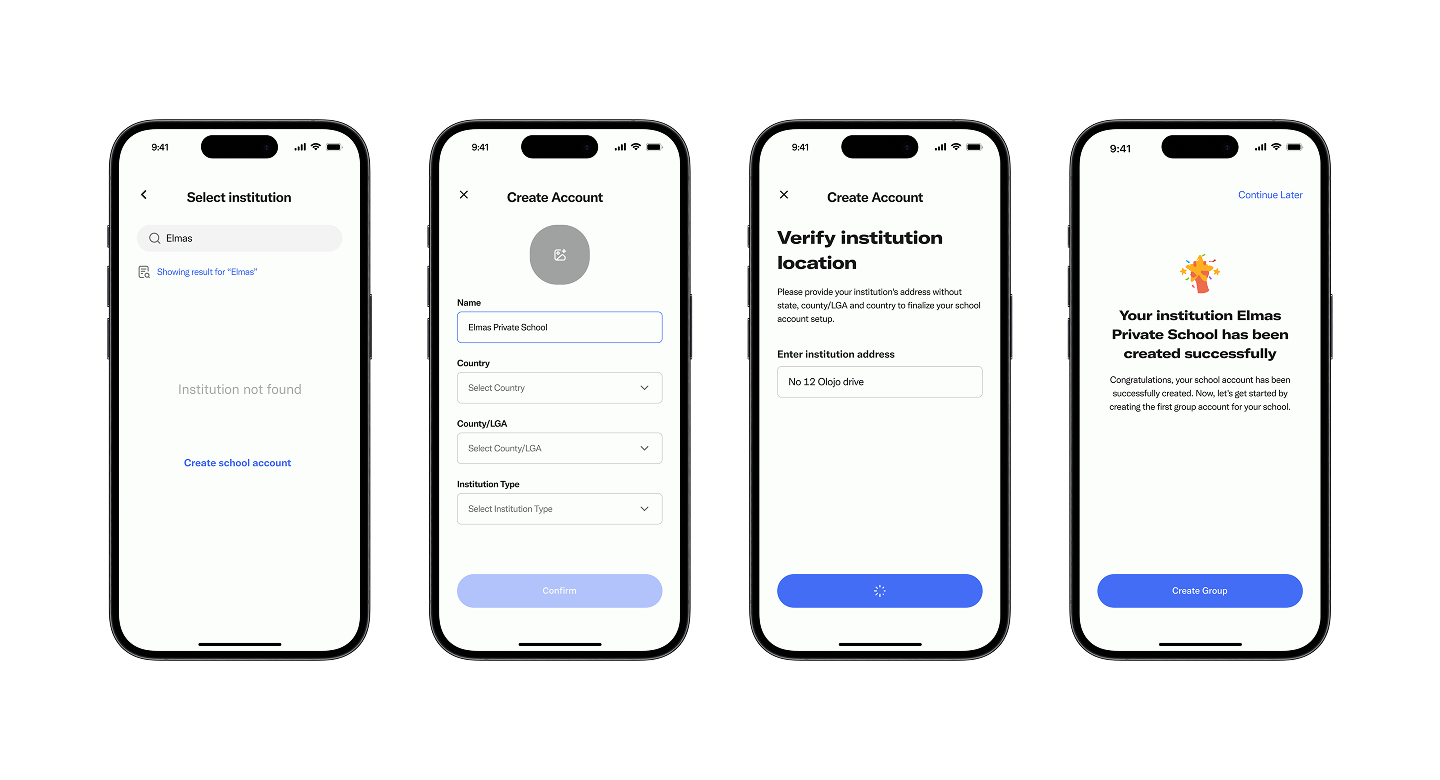
When a school isn't in the database, the empty search state offers "Create school account" so the flow continues instead of stopping. A two-step form collects identity, then address; success drops the user straight into creating the first group.

How it works

01

"Institution not found" links directly to school creation.

02

Name pre-fills from the search query; country, county/LGA, and type are dropdowns.

03

A second screen verifies the street-level address with minimal input.

04

Success confirms the account and moves into group creation.

System logic

Confirm stays inactive until all required fields are complete.

Name + country + county forms a composite key; matches are flagged before creation.

Async creation: a spinner replaces the CTA until the account is confirmed.

Four screens: empty search state, creation form, address verification, and success confirmation
System 03

School tags

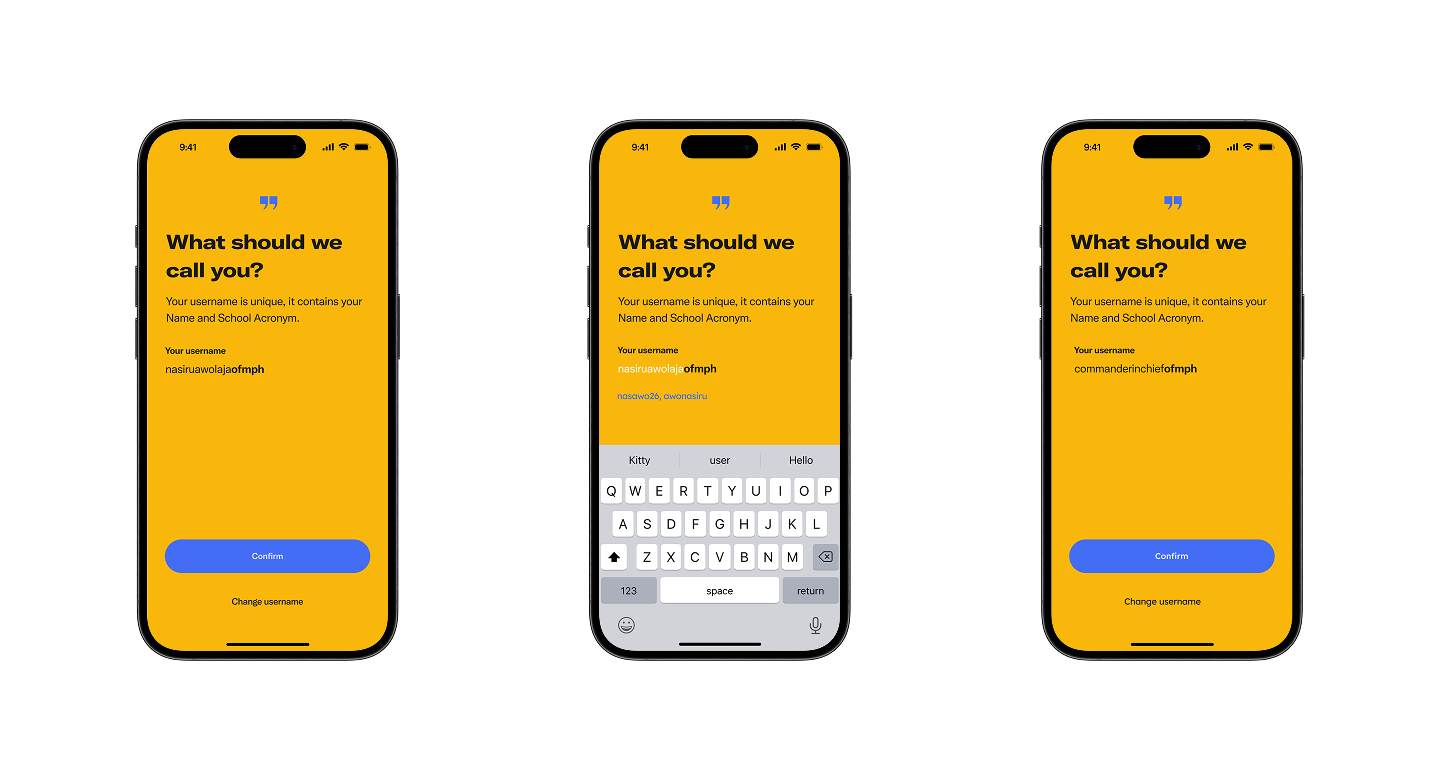
Every username carries the user's school acronym, so community membership is visible on every post, message, and comment. Users who attended multiple schools can switch their active tag.

How it works

01

A default username is generated from the user's name plus the school acronym.

02

The name portion is editable with live suggestions; the acronym stays fixed.

03

Confirm locks it in across posts, chat, and profile.

04

"Change username" allows re-entry at any time.

System logic

Real-time uniqueness validation prevents duplicates system-wide.

Past activity keeps whichever tag was active when it was posted.

No school followed means no tag; the username stays name-only until one is added.

Three screens: auto-generated username, live editing with suggestions, and confirmation
System 04

Timeline

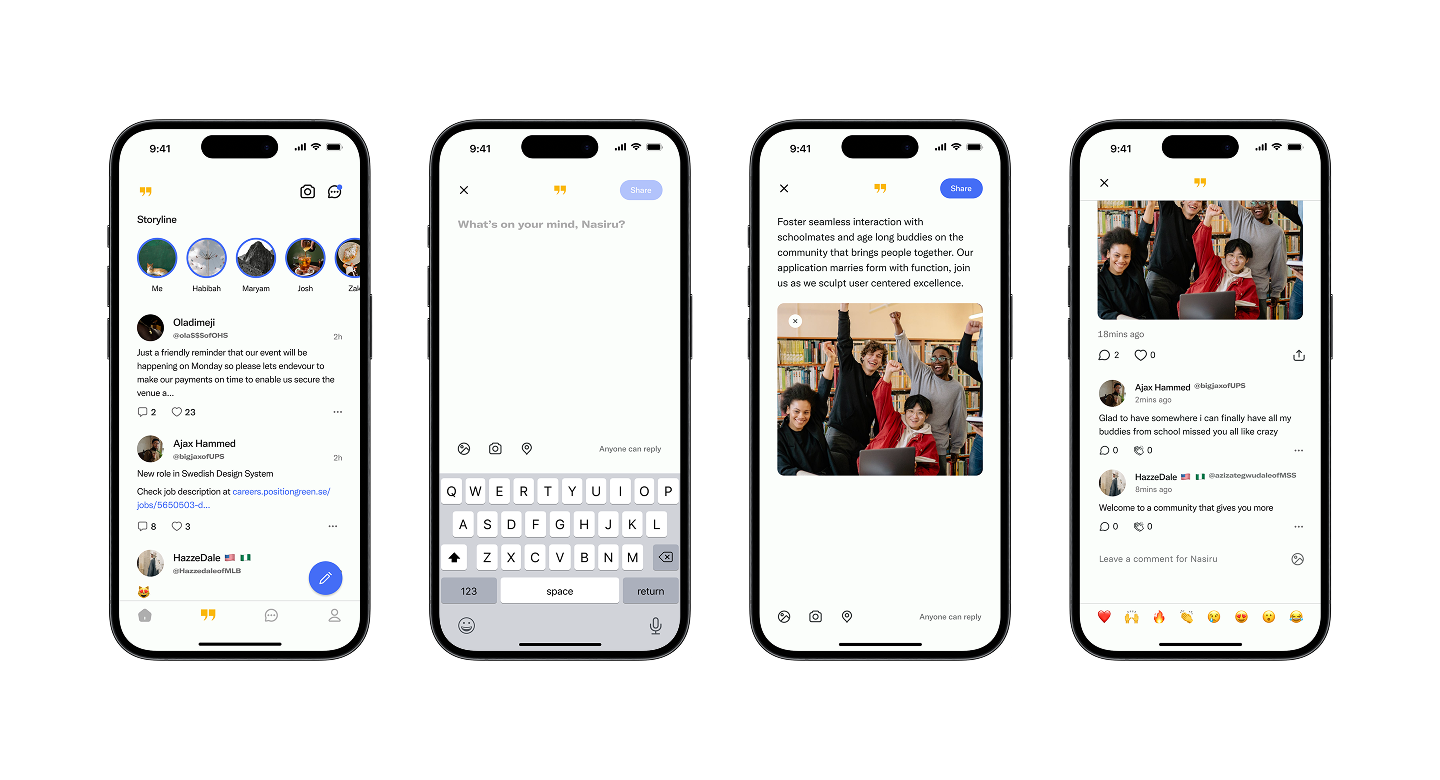
The main feed: a stream of posts from friends, school communities, and groups, ranked by shared schools, follow relationships, and engagement, with recency as the tiebreaker.

How it works

01

The Storyline row sits on top; the ranked feed starts with the most relevant post.

02

Each post card shows the author's username and school tag, body, media, and counts.

03

A floating compose button opens a sheet; text and media combine freely.

04

Post detail: image on top, threaded comments, emoji bar pinned to the bottom.

System logic

Shared-school posts rank highest, then direct follows, then broader engagement.

New posts and reaction counts push live, without a full reload.

Six emoji reactions on every post and comment; commenters' school tags stay visible.

Four screens: the feed, post composer, media post creation, and a comment thread
System 05

Groups

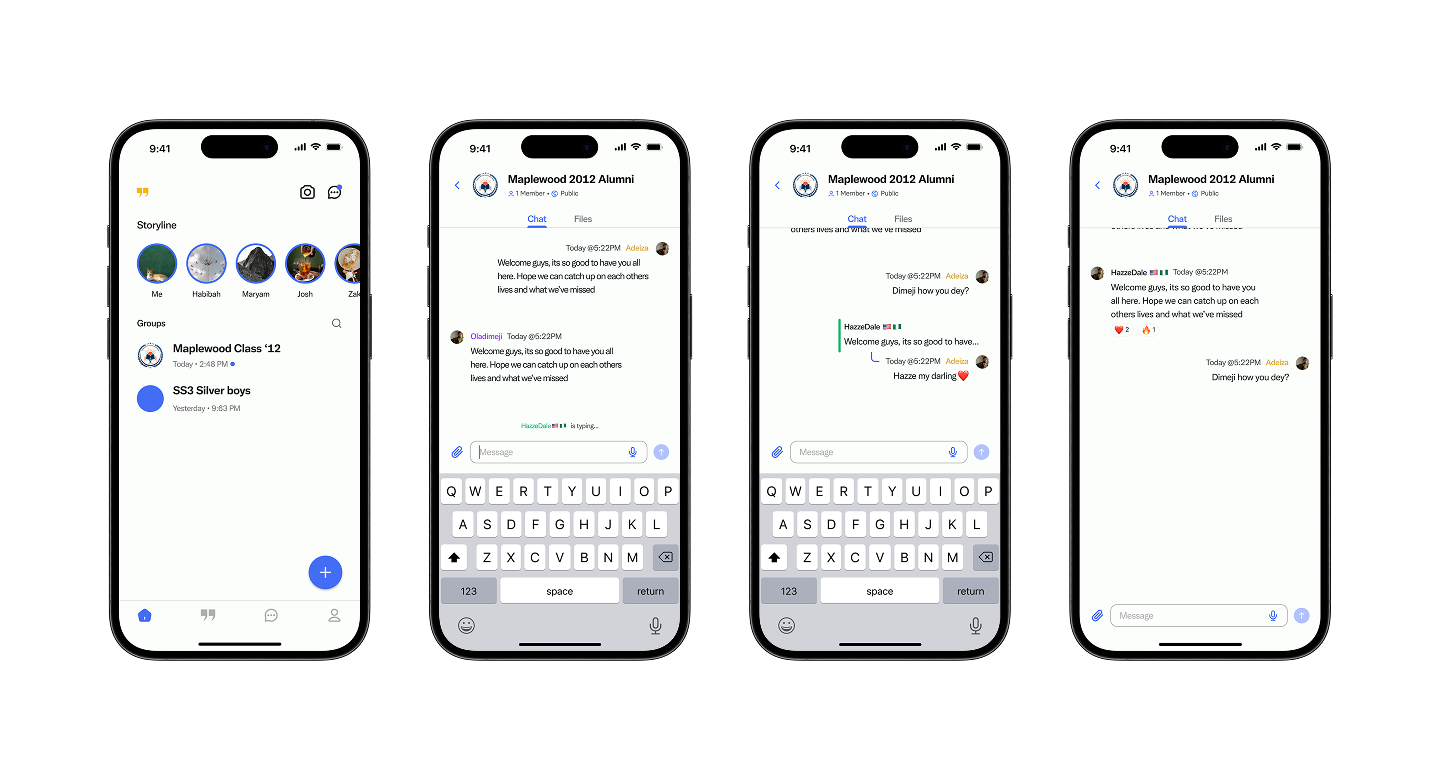
Dedicated spaces where classmates, club members, and alumni message, share files, and reconnect. Groups are tied to specific schools and graduation sets, so finding the right one is straightforward.

How it works

01

Groups sit below the Storyline row: name, last message preview, timestamp.

02

The header shows member and follower counts; Chat and Files tabs split conversation from media.

03

Messages deliver instantly with read receipts and typing indicators.

04

Emoji reactions work on any message; files stay in their own tab.

System logic

The creator becomes admin automatically, badge shown inline on messages.

Follow = observer; member = full participant. Groups are recommended by school tag.

WebSocket delivery: per-message read receipts, live typing broadcast.

Four screens: groups list, group chat with typing indicator, active conversation, and reactions
System 06

Messaging

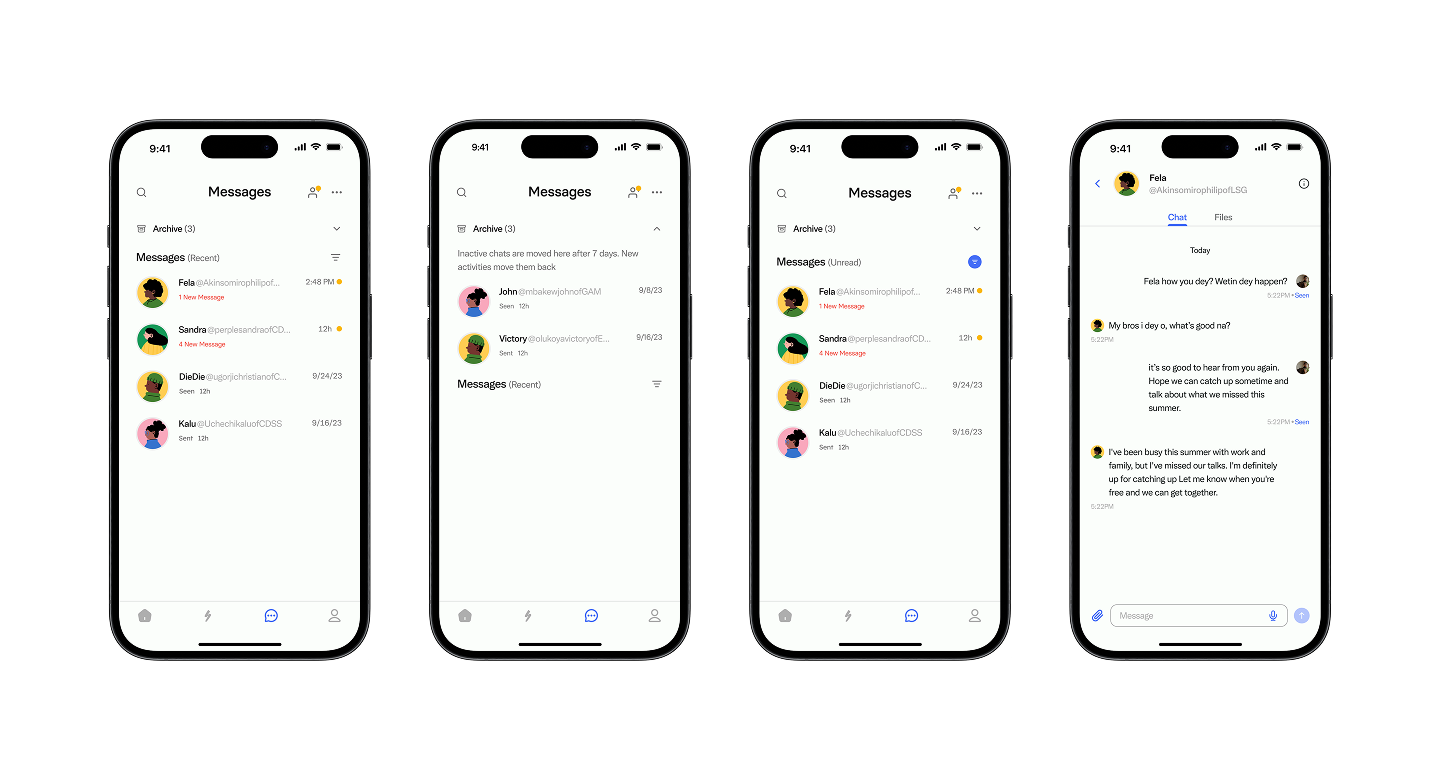
Private, real-time conversations, 1-on-1 or group, with each contact's school tag in the chat header so community context stays visible even between people who met years ago.

How it works

01

The inbox opens on Recent: contact, preview, timestamp, unread count.

02

Unread and Archive filters keep the list manageable.

03

A date separator marks where the current session begins in the thread.

04

Media, videos, and documents share one thread with the messages.

System logic

Chats idle for 7 days auto-archive; new activity restores them instantly.

Three-state delivery: Sent → Delivered → Read, visible on list items and in-thread.

Push notifications cover the background; WebSocket covers the foreground.

Four screens: messages inbox, archive, unread filter, and a 1-on-1 chat thread
System 07

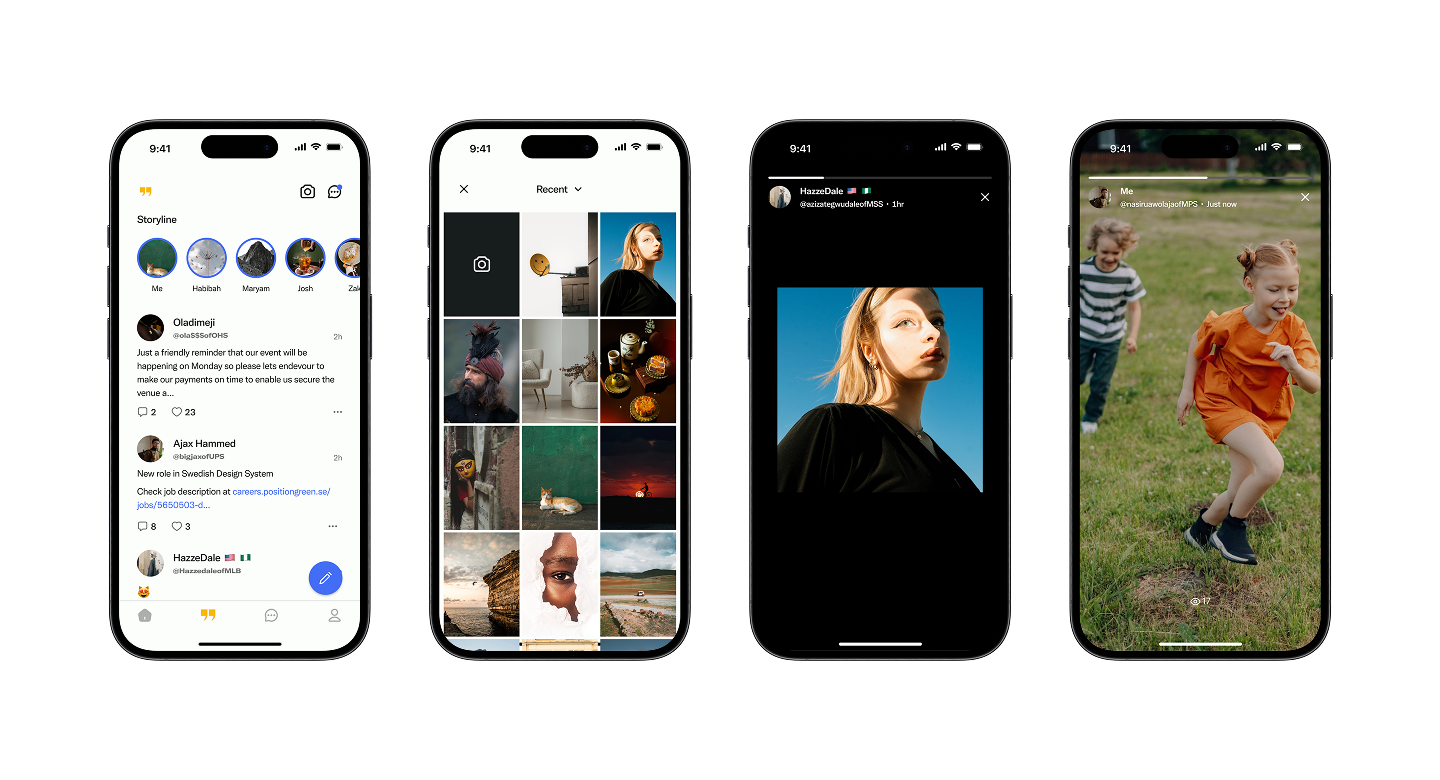
Storyline

Photos and videos that expire after 24 hours, shared as circular avatars in a row at the top of the feed and viewed full-screen with a segmented progress bar.

How it works

01

The "Me" avatar leads the row for quick creation; unviewed friends follow with an active ring.

02

Tap right to advance, left to go back; swipe to the next user's stories.

03

A reply input sends responses straight to the author's DMs.

04

Stories expire automatically 24 hours after posting.

System logic

Expiry is scheduled at publish time; no manual cleanup.

Viewed stories grey their ring; the row re-orders so unviewed content leads.

Replies create the DM conversation automatically if one doesn't exist.

Four screens: feed with story row, stories grid, full-screen viewer, and sequential navigation
Supporting flows

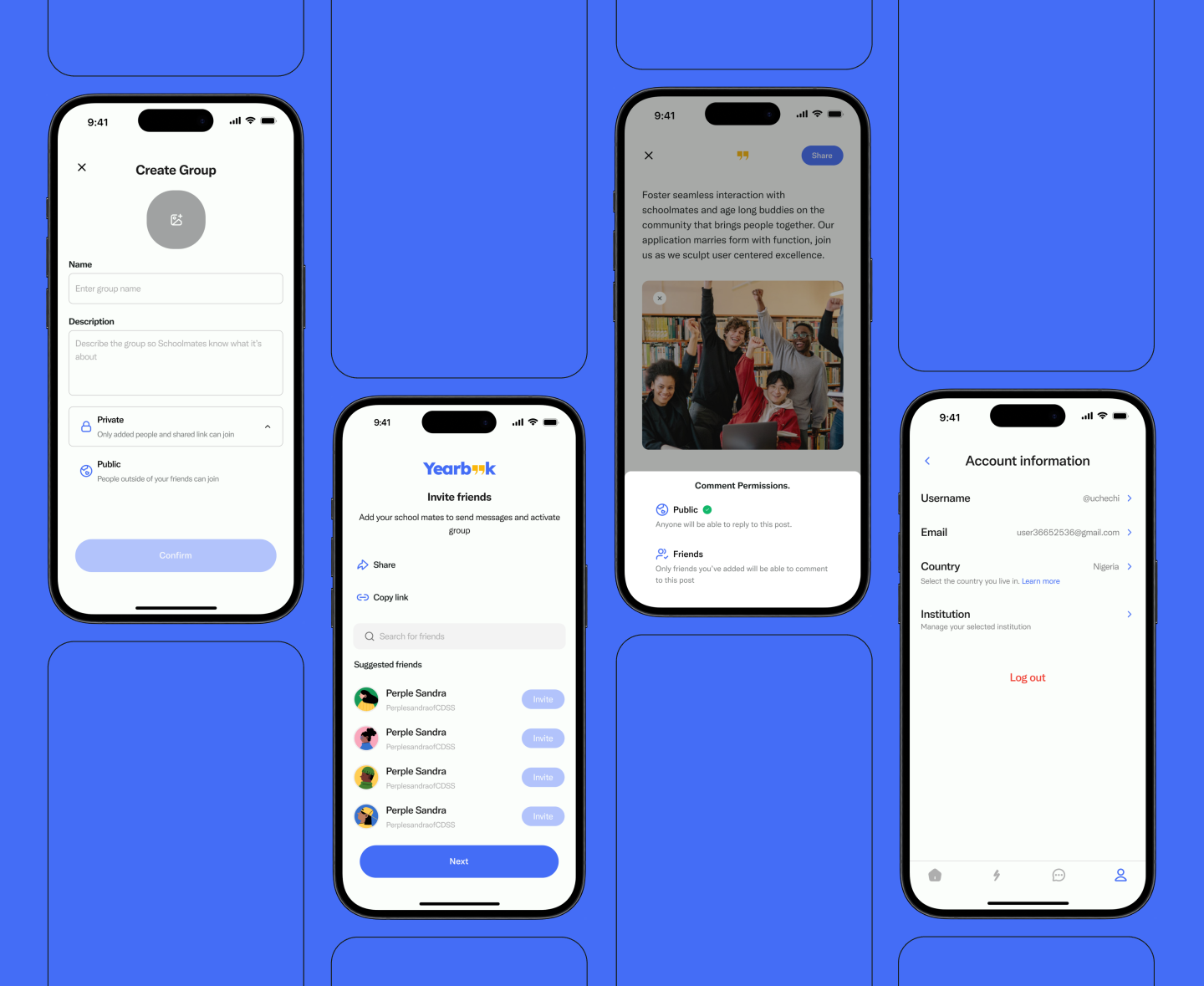
The details that complete the picture

Group creation with Private or Public visibility. Friend invites by link or search. Per-post comment permissions, set at the moment of sharing. Account information, editable in one place and linked back to the school registration system.

Create group, invite friends, comment permissions, and account information screens
05 · The outcome

What it meant to the people who used it.

+0%

felt more connected to a past community after one week, with no prompting.

0×

more memories shared per session than baseline social platforms in moderated testing.

0%

onboarding drop-off compared to the early prototype, from removing unnecessary steps.

Memories get preserved somewhere structured and searchable, and the communities that shaped people finally have a real digital home.

06 · Reflection

Three things this project taught me.

(01)

Simplicity improves usability.

Every screen removed is a barrier eliminated. The best interfaces feel inevitable, not engineered; they exist because they had to.

(02)

Familiar patterns lower activation energy.

When something feels familiar, users trust it faster and engage more deeply. Familiarity works best as a foundation; you build the unexpected on top of it.

(03)

Emotion-driven design is the most powerful design.

When an interface connects to memory and identity, it moves past utility. People come back because they want to, not because they have to.

The best memory platform is the one that makes you feel less alone in your past.